Natural Silhouette Panel Bundle: A Practical Guide to Choosing and Using Organic Vector Designs
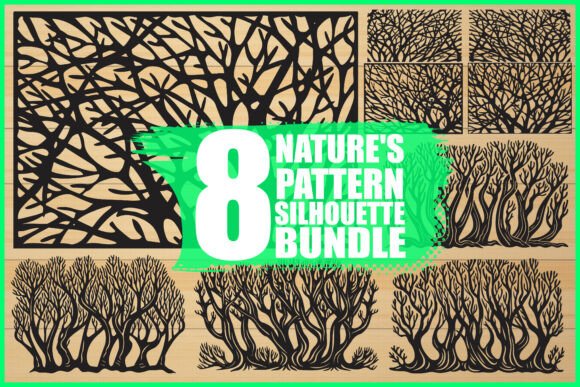
When you are looking to elevate a home décor project or streamline your digital design workflow, the appeal of organic, nature-inspired aesthetics is undeniable. The Natural Silhouette Panel Bundle offers a curated collection of eight intricate tree branch and organic cutout designs that bridge the gap between raw natural beauty and precise digital utility. However, simply downloading a set of vector files does not guarantee a successful outcome. Many creators, from hobbyists to small business owners, overlook critical details regarding file compatibility, cutting optimization, and design application. Understanding these nuances is essential to avoiding wasted materials, frustrated clients, and subpar results.
Understanding the Value of High-Quality Organic Vectors
This bundle is not just a random assortment of clip art; it is a specialized toolkit for physical and digital fabrication. Featuring detailed silhouettes of tree branches and natural patterns, these designs are optimized for high-precision manufacturing methods such as laser cutting, vinyl cutting, and CNC routing. The inclusion of multiple file formats—SVG, EPS, PNG, JPG, AI, and PDF—ensures that whether you are using a consumer-grade Cricut machine or industrial-scale production software, you have the right tool for the job.
The primary value lies in the intricacy of the designs. Natural patterns are notoriously difficult to replicate manually with consistency. By leveraging pre-designed, professionally vetted vectors, you save hours of drafting time. Yet, this convenience often leads to a false sense of security. Users assume that because a file is labeled "vector," it is automatically ready for any machine. This is a fundamental misunderstanding that can lead to significant operational headaches.
Common Mistakes in File Selection and Preparation
One of the most frequent errors users make is ignoring the specific requirements of their cutting hardware. For instance, while SVG files are universally compatible with most web-based cutting software, they may lack the node precision required for complex CNC operations. Conversely, AI and EPS files offer superior control over anchor points but require professional software like Adobe Illustrator or CorelDRAW to edit properly. Beginners often attempt to edit complex EPS files in basic graphic editors, resulting in corrupted paths and jagged edges that ruin the final cut.
Another overlooked detail is the distinction between screen resolution and print resolution. The bundle includes high-resolution JPGs and transparent PNGs, which are excellent for digital mockups, invitations, and web backgrounds. However, some users mistakenly attempt to use these raster images for large-format printing or scaling them up for wall panels. Unlike vectors, raster images pixelate when enlarged. If you are creating a large decorative screen or a wall-sized art piece, relying on JPG or PNG files will result in a blurry, unprofessional appearance. Always default to the vector formats (SVG, EPS, AI, PDF) for any project that requires scaling beyond the original image dimensions.
Optimization for Laser and Vinyl Cutting
Even when using the correct vector format, poor preparation can lead to failed cuts. A common issue with intricate natural silhouettes is the presence of "floating" nodes or overly complex paths that confuse cutting machines. Before sending a design to your laser cutter or vinyl plotter, it is crucial to inspect the file for closed paths and unnecessary anchor points. If a branch design has thousands of nodes, the machine may stutter, burn the material, or take exponentially longer to complete the job.
For laser cutting, the thickness of the material matters significantly. Intricate branch designs may have thin connections that break easily if cut from brittle materials like acrylic or thin wood. A better approach is to test the design on a scrap piece of your intended material first. Adjust the power and speed settings to ensure clean cuts without excessive charring. For vinyl cutting, consider the weeding process. Highly detailed organic patterns can be nightmares to weed if the negative spaces are too small. Simplifying the design slightly or choosing a larger scale can make the physical handling of the final product much more manageable.
Design Application and Contextual Fit
Beyond technical preparation, there is the matter of aesthetic application. A frequent mistake is forcing a natural silhouette into a context where it clashes with the overall design language. These organic cutouts work best when they complement minimalist or rustic themes. Overloading a space with multiple complex patterns can create visual noise rather than elegance. When using these designs for wall panels or decorative screens, consider the balance between positive and negative space. The beauty of a silhouette lies in what is removed as much as what remains.
For digital designers and marketers, these assets are invaluable for creating textured backgrounds or framing elements in invitations and brochures. However, ensure that the contrast between the silhouette and the background is sufficient for readability. Placing a dark branch silhouette against a busy, dark background renders the design invisible. Use the transparent PNGs to layer these elements over solid colors or subtle gradients to maintain clarity and impact.
What to Check Before You Begin
To ensure a smooth workflow with the Natural Silhouette Panel Bundle, adopt a checklist approach before starting any project:
- Verify Software Compatibility: Confirm that your design software can open and edit the specific vector format you choose (AI, EPS, or SVG).
- Inspect Node Complexity: Open the vector file and check for excessive anchor points. Simplify paths if necessary to improve cutting efficiency.
- Test Scale and Material: Print or cut a small section of the design to evaluate how the intricate details hold up in your chosen material.
- Check Resolution Needs: Use vector files for scaling and printing; reserve JPGs and PNGs for digital-only applications.
- Consider Weeding and Assembly: For vinyl projects, ensure the design is not so intricate that it becomes impossible to weed or apply cleanly.
By addressing these practical considerations, you transform a simple digital download into a reliable component of your creative process. The Natural Silhouette Panel Bundle provides the raw material for elegant, nature-inspired creations, but the quality of the final output depends entirely on your understanding of the tools and techniques involved. Avoiding these common pitfalls ensures that your projects not only look professional but are also efficient to produce, saving you time, money, and frustration in the long run.
Whether you are crafting custom home décor, designing unique invitations, or developing print-on-demand products, treating these assets with the technical respect they deserve will yield superior results. Embrace the organic beauty of these designs, but ground your execution in practical, informed decision-making.